What is the difference between 1080 p and 720 p resolution?
Quick Summary: 1080p (Full HD) offers 2.1 million pixels, providing double the detail of 720p (Standard HD). While these remain the workhorses of AV, the industry has shifted towards 4K60 (Ultra HD at 60Hz) for mission-critical clarity and fluid motion in professional control rooms.
When it comes to video quality, we’re all used to seeing a collection of numbers splattered on our television packaging, on laptop screens and on streaming services, but what do they actually mean?
Whether it’s 1080p, 4k, 720p or 360, the numbers can all start to blur into one, making it difficult to differentiate and understand what the actual difference is. If you’re sick of seeing a bunch of numbers and not understanding what they mean, you’re in the right place.
At DEXON, we make it our responsibility to ensure you understand what you’re in for when you select a 1080p, 720p or 4k monitor. Today, we’ll be discussing what TV resolution is, the difference between 1080p and 720p and why this matters to your viewing experience.
What does TV resolution mean?
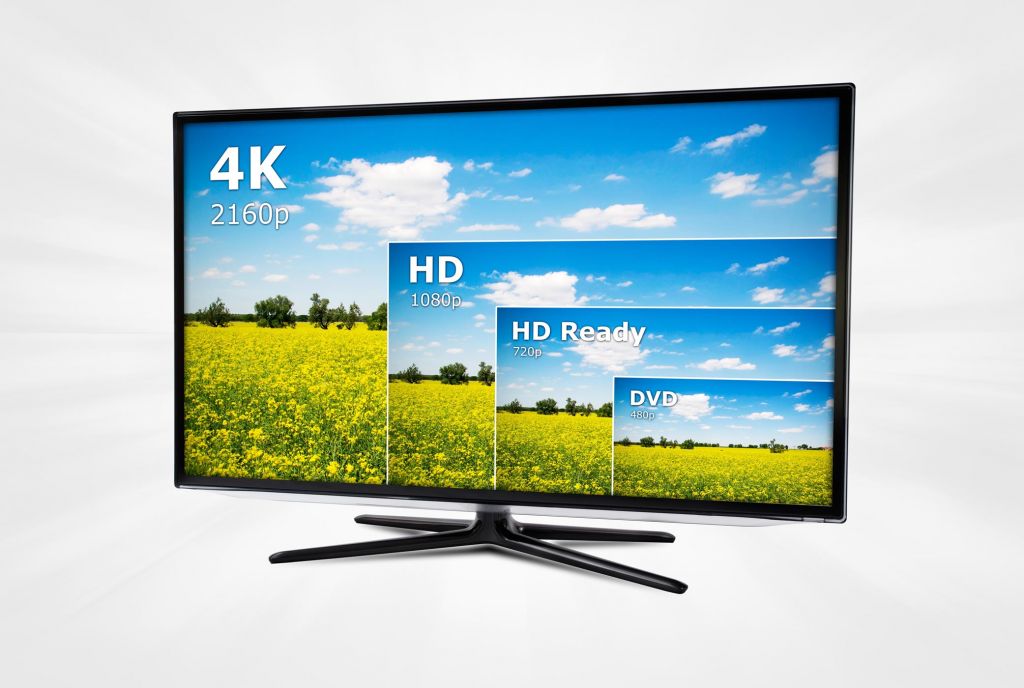
Before we start getting into the specific numbers, it’s very important that we discuss the primary topic, which is TV resolution. Both 1080p and 720p refer to the TV resolution which is defined by the number of vertical and horizontal pixels. Putting it simply, TV resolution will determine the quality of the picture on your TV.
Generally speaking, the higher the resolution number, the higher the quality. On higher resolution televisions, images will appear a lot crisper and allow you to identify smaller details, whereas lower resolutions like 360p and below will appear relatively blurry with little to no sharp edges to your image.
When we talk about TV resolution, it’s important to distinguish the difference between native and image resolution. Native resolution refers to the TV or monitor’s resolution and what it can physically provide to viewers. Image resolution refers to the resolution of the image signals sent to the TV via a HDMI cable. This difference is the reason why a 4K UHD TV may display a high-definition image when you go to watch a film or select something from your TV guide.
What does the “p” stand for?
While many would naturally assume that the “p” in these numbers stands for pixels, you’d actually be wrong. P stands for progressive scan (also known as non-interlaced scanning). This refers to the format that displays, moves and stores moving images when all lines in the frame rate are sequential.
In other words, the progressive scan means that all the lines in a frame appear at the same time. With progressive scanning, the image frame refreshes every cycle. This makes images very high quality.
What is 1080 p resolution?
Now that we understand the specifics, let’s get onto the nitty gritty. So what is 1080p? 1080p is a type of high-definition television that displays 1,980 pixels horizontally across a screen and 1,080 pixels vertically down the screen.
With 1080p, it usually pimples a wide aspect ratio of around 16:9 and a resolution of 2.1 megapixels. 1080p is one of the most common streaming resolutions on websites like YouTube, as it offers high resolution without eating up too much internet bandwidth to display the quality.
Although 1080p is often marketed as 2K resolution, it’s important to note that these are different as they have different aspect ratios and resolutions.
As with other resolutions, this number refers to the total number of pixels displayed across a screen at any time. To understand how many pixels this is, you’ll need to multiply the vertical number by the horizontal. So, that would be 1,980 x 1,080 for a 1080p television. That means that there are 2,138,400 pixels on a screen in a 1080p high-definition television.
 |
 |
What is 720p resolution?
720p resolution is another example of standard high-definition television. With 720p P&A television has a total of 1280 horizontal pixels and 720 vertical pixels. The aspect ratio for a 720p television is 16:9.
To work out the number of pixels on a 720p compatible television, you need to do the same equation applied to 1080p. To do this you can simply multiply 1280 by 720. That means on a 720p television, there are 921,600 pixels at any given time.
Although part of the high definition club, 720p doesn’t usually compare to 1080p on today’s computer monitors. Anyone who has ever switched from 1080p to 720p resolution will tell you that the difference, although immediately very minor, makes a big difference overall. However, there are some positives.
720p takes up less bandwidth and data than 1080p or 4K, so is a lot more budget-friendly for anyone streaming content via their mobile data on their smartphone or tablet.
The 2026 Standard: 4K60 in Mission-Critical Environments
As we move through 2026, professional environments have surpassed 1080p in favor of 4K60 resolution (3,840 x 2,160 pixels at 60 frames per second). In mission-critical settings like command centers or medical theaters, 4K60 is vital because it provides four times the pixel density of 1080p.
More importantly, the 60Hz refresh rate ensures ultra-smooth motion, which is essential for tracking fast-moving data or high-speed video feeds without motion blur. For a reliable 24/7 setup, the industry is progressively transitioning to 4K60 as the new global baseline for situational awareness and precision.
1080 p vs. 720 p: what are the differences?
Now you understand what both 1080p and 720p mean, let’s discuss some of the key differences. Here are some of the key differences you may notice if you have a keen eye:
- Picture quality - Although there’s very little difference between the image quality of both 1080p and 720p, switching between the two will expose that 1080p results in a sharper clearer image than 1080p.
- Pixel count - Of course, one of the most noticeable differences between the two resolutions is the pixel count. 720p has a pixel count of under a million, whereas 1080p has well over two million pixels. This has a slight impact on image quality and clarity.
- Data usage - Data usage - for 720p, a 60 frame-per-second video will use around 1.86 GB an hour, whereas 1080 will use around 3.04GB an hour.
Where do we use 1080 and 720 resolutions?
We tend to refer most heavily to 1080p and 720p resolutions with anything involving a monitor or television. This includes streaming, watching satellite TV or even gaming. The two resolutions make the most difference when it comes to internet streaming, as each uses up different amounts of bandwidth which can impact internet speed.
The next time you’re browsing through YouTube, for example, try changing the resolution to a lower setting and see how quickly your video loads in comparison to higher resolutions. These two resolutions also have a significant impact on gaming.
This is because 1080p devices require less anti-aliasing to make images appear smoother and more cohesive due to the higher pixel count.
Final thoughts
We hope you now feel more confident in your knowledge about both 720p and 1080p. Why not check out the rest of DEXON’s blog where we discuss all aspects of AV technology, including deep-diving into the world of resolution and high-definition television?
As the AV landscape evolves, understanding the difference between 720p and 1080p is just the beginning. Today, with the industry-wide transition to 4K60 resolution, choosing the right equipment—such as our high-performance video wall processors, matrix switchers, and controllers—is essential for future-proofing your mission-critical operations and ensuring ultra-high-resolution viewing experiences.
Resolution & 4K60 FAQ
Q: Why is 4K60 preferred for mission-critical control rooms?
A: 4K60 provides a 60Hz refresh rate, meaning the image updates 60 times per second. In mission-critical environments, this prevents "ghosting" and ensures that mouse movements and data scrolls are perfectly fluid, significantly reducing operator fatigue during long shifts.
Q: Can a 1080p Video Wall Controller display 4K60 content?
A: Yes. DEXON’s controllers can receive 4K60 signals and downscale them for 1080p displays, or conversely, upscale 1080p content to fit a 4K video wall while maintaining frame-accurate synchronization and signal integrity.
Q: What is the exact resolution of 4K60?
A: 4K UHD resolution is 3,840 x 2,160 pixels, offering four times the detail of standard 1080p. The "60" refers to the 60Hz refresh rate, which is the current 2026 standard for professional-grade fluidity and precision.